
TL;DR
A combination of low-cost mini PCs, Tailscale networking, and CLI agents like Claude Code has made running a home server more accessible and enjoyable. The author set up an Ubuntu Server on a Beelink Mini N150, installed Claude Code on the box, and used it to configure containerized services and monitoring without heavy manual configuration.
What happened
The author revisited home self-hosting and found the experience transformed by three converging factors: inexpensive, low-power mini PCs, Tailscale for easy secure networking, and CLI agents—specifically Claude Code—to automate configuration. They bought a Beelink Mini N150 (around $379) and an 8TB NVMe SSD, flashed Ubuntu Server 22.04 LTS, joined the machine to a Tailscale private network, and installed Claude Code on the server. Using natural-language prompts, Claude Code handled tasks such as installing Docker, generating Docker Compose files, adding services into containers, placing services behind Caddy for TLS, persisting data, keeping images updated, and enabling restart-on-boot. The setup now runs a suite of personal services—Vaultwarden, Plex, Immich, Uptime Kuma, Caddy, Home Assistant, and ReadDeck—each in its own container. Monitoring is handled by Uptime Kuma with email alerts, and utilities like Lazydocker and Glances provide quick terminal UIs and system metrics.
Why it matters
- Lowers the technical barrier to self-hosting by automating Docker and config tasks via CLI agents.
- Makes self-hosting feasible on affordable, low-power hardware rather than dedicated racks or expensive servers.
- Tailscale removes common networking hurdles (like port forwarding) for remote access.
- Enables personal control over services (passwords, photos, media) that are commonly held in SaaS platforms.
- Reduces time spent on maintenance so users can focus on using software rather than managing infra.
Key facts
- Three enablers: cheap mini PCs, Tailscale networking, and CLI agents such as Claude Code.
- Hardware used: Beelink Mini N150 (~$379) plus an 8TB NVMe SSD purchased for a few hundred dollars.
- Operating system installed: Ubuntu Server 22.04 LTS.
- Claude Code was installed on the server and tasked with setting up Docker, Docker Compose files, services, reverse proxy (Caddy), data persistence, updates, security packages, and restart-on-boot.
- Services run as containers and include Vaultwarden, Plex, Immich, Uptime Kuma, Caddy, Home Assistant, and ReadDeck.
- Vaultwarden served as the turning point for trust—passwords were exported from iCloud/Keychain and imported into Vaultwarden.
- Immich is used as a Google Photos replacement with mobile apps, local face-recognition (described as slow on the machine), timeline and map views, and automatic uploads.
- Uptime Kuma monitors services and sends simple email alerts on outages and recoveries.
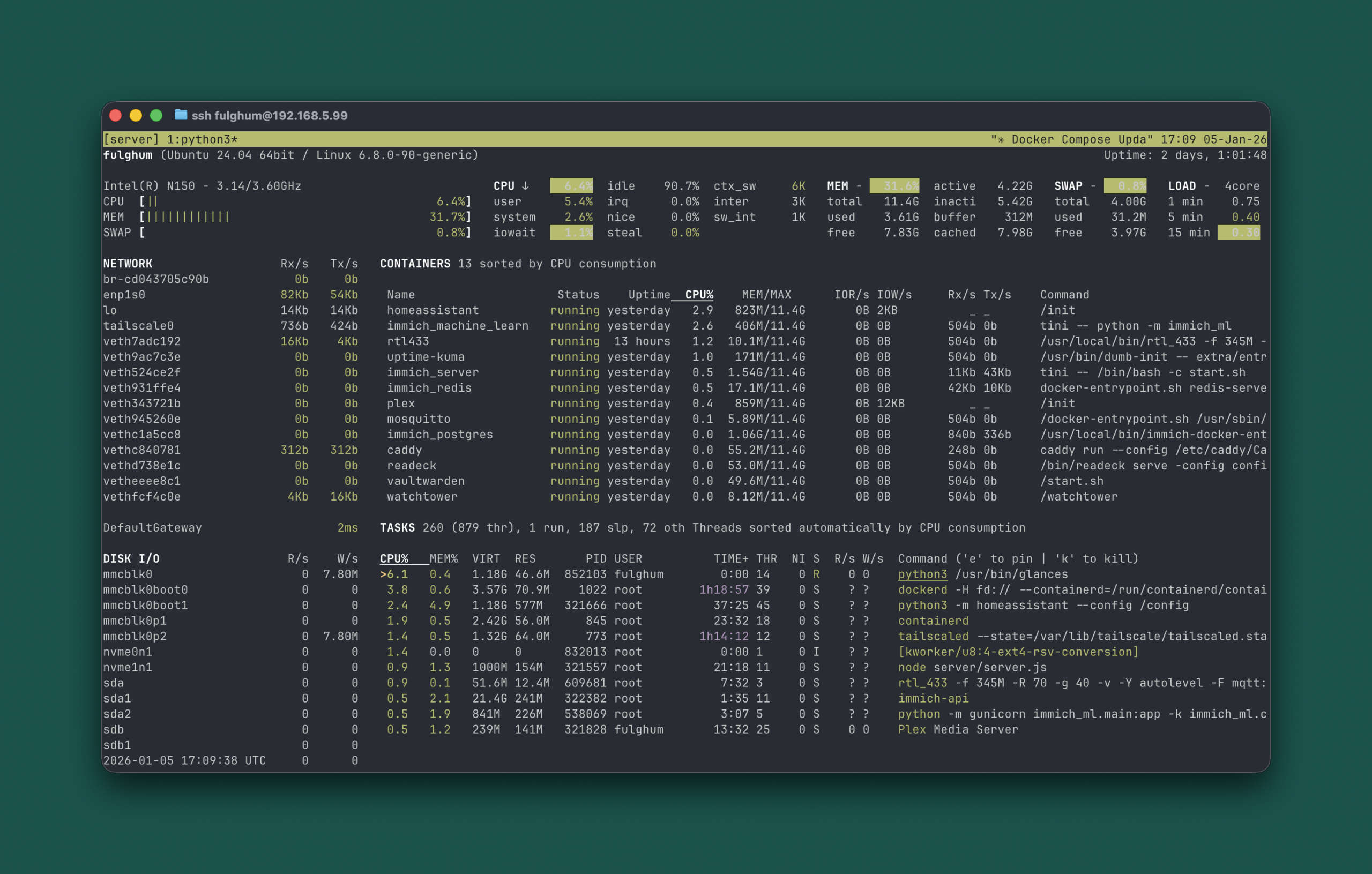
- Terminal utilities Lazydocker and Glances are used for container management and system resource monitoring; the box ran 13 containers at about 6% CPU and 32% memory in the author’s tests.
- The author reports accessing services from phone, laptop, and tablet as if they were local.
What to watch next
- How CLI agents evolve to handle more complex or edge-case infrastructure scenarios: not confirmed in the source
- Long-term maintenance and security implications of relying on agent-generated configs and automation: not confirmed in the source
- Dependence on third-party networking tools like Tailscale and how changes to those services might affect remote access: not confirmed in the source
Quick glossary
- CLI agent: A command-line program that can perform tasks or automate workflows, often driven by natural-language prompts or scripts.
- Docker Compose: A tool for defining and running multi-container Docker applications using a YAML file to configure services, networks, and volumes.
- Reverse proxy: A server that forwards client requests to backend services, often used to centralize TLS termination and routing for multiple services.
- Tailscale: A mesh VPN service built on WireGuard that simplifies secure networking between devices without manual port forwarding.
- Vaultwarden: A lightweight, self-hosted server compatible with Bitwarden clients, used to store and manage passwords.
Reader FAQ
Do you need to be a sysadmin to follow this approach?
The author says this is aimed at people comfortable in a terminal who don't want to become full-time infrastructure experts.
What hardware and OS were used?
A Beelink Mini N150 (~$379) with an 8TB NVMe SSD and Ubuntu Server 22.04 LTS were used.
What can Claude Code do on the server?
According to the author, Claude Code was used to install Docker, create Docker Compose files, deploy services, configure Caddy, persist data, update images, add security packages, and enable restart-on-boot.
Can services be accessed from mobile devices?
The author reports accessing everything from phone, laptop, and tablet like it is local.
Is long-term reliability or security impact discussed?
not confirmed in the source
2026 is the Year of Self-hosting by Jordan Fulghum, January 2026 Your home server's new sysadmin: Claude Code I have flirted with self-hosting at home for years. I always bounced…
Sources
- CLI agents like Claude Code make self-hosting on a home server easier and fun
- A look at AI coding agents – Claude Code and CoPilot CLI
- How we built our own Claude Code
- Self-Hosting Models IS for Nerds – Miriah Peterson – Medium
Related posts
- What If AI Agents Were Assigned Zodiac Personalities — An LLM Experiment
- Why 2026 Could Be the Year Ordinary Users Embrace Self-hosting
- iMessage-kit: Type-safe macOS SDK for reading, sending and automating iMessage