
TL;DR
Apple’s iOS 26 expands Messages with five group chat additions: typing indicators, in-thread polls, group Apple Cash transfers, shared chat backgrounds, and a quick 'Add to Contacts' button. Some features integrate with Apple Intelligence for suggestions; availability depends on running the newest update.
What happened
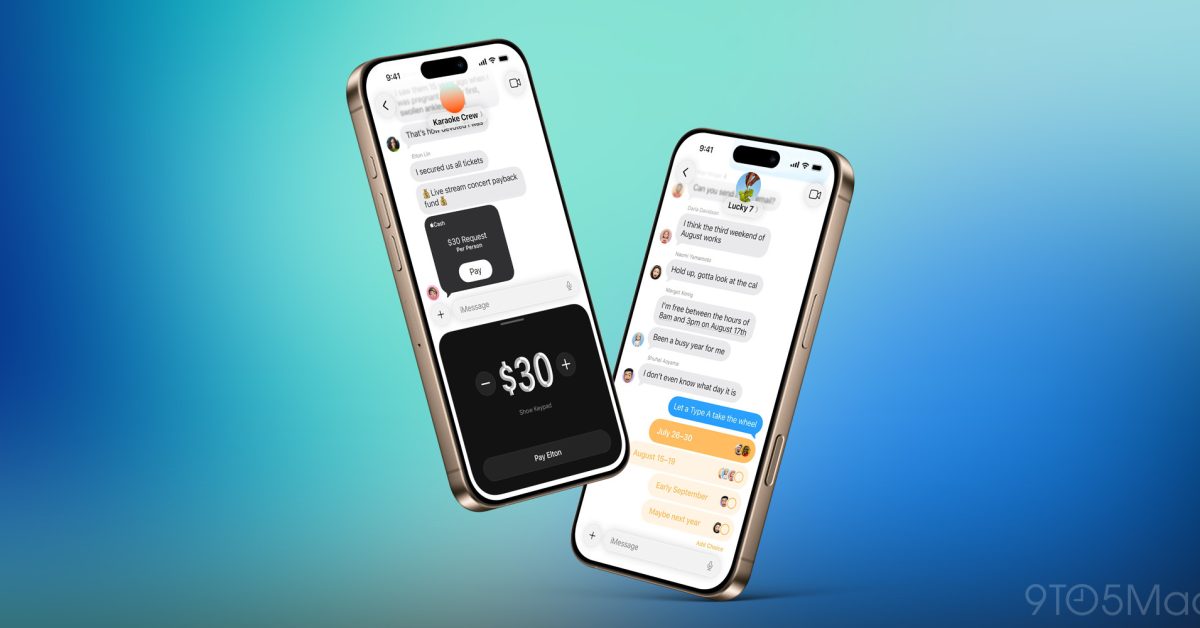
With iOS 26, Apple has updated the Messages app to add five features aimed at improving group chat usability. Typing indicators, previously limited to one-on-one iMessage threads, now appear in group conversations among users on the latest software. A new Polls option—accessed via the '+' button in the lower-left of Messages—lets participants create quick votes; devices that support Apple Intelligence may surface suggested polls above the software keyboard. Group chats now support Apple Cash for sending and requesting money directly in a thread, an expansion from its solo-conversation-only status in iOS 18. Conversations can be customized with shared backgrounds selectable from built-in options, personal photos, or creations from Image Playground; any background set applies to all members. Finally, the group details view includes an 'Add to Contacts' button next to members who aren’t saved in your address book, simplifying contact capture from group messages.
Why it matters
- Group typing indicators reduce confusion over who is composing messages in multi-person threads.
- Built-in polls and Apple Cash aim to streamline coordination and bill-splitting without leaving Messages.
- Shared backgrounds let groups personalize conversations, creating a consistent look for all members.
- The quick add-contact flow makes it easier to save unknown numbers encountered in group chats.
Key facts
- Typing indicators now work in group conversations when participants run iOS 26.
- Polls are available from the '+' button in the lower-left corner of Messages.
- If an iPhone supports Apple Intelligence, Poll suggestions can appear in the row above the software keyboard.
- Apple Cash can now be used inside group chats; previously it was limited to solo conversations in iOS 18.
- Backgrounds are set from the group details view (tap the group icon at the top) and can be chosen from built-in options, personal photos, or created in Image Playground.
- Any background set for a group chat is visible to all members of that group.
- The group details view also lists members and shows an 'Add to Contacts' button next to people not already saved in your contacts.
What to watch next
- Which iPhone models and regional releases will support each feature: not confirmed in the source.
- Whether Apple lays out privacy or moderation controls for polls and shared backgrounds: not confirmed in the source.
- How Apple Cash group transfers behave with group billing or split-payment workflows: not confirmed in the source.
Quick glossary
- Typing indicator: A visual cue in a chat that shows when someone in the conversation is typing a message.
- Polls (in Messages): A built-in Messages feature that lets chat participants create and vote on a question inside a conversation.
- Apple Cash: Apple’s peer-to-peer payment feature that enables sending and requesting money between users.
- Backgrounds (Messages): A visual image or design applied behind the message bubbles in a conversation, visible to all chat members.
- Apple Intelligence: On-device and cloud-powered features that can surface suggestions and assistive tools within Apple apps.
Reader FAQ
Do typing indicators require iOS 26 for everyone in the group?
Typing indicators work in group chats when participants are running the latest update; broader device compatibility is not confirmed in the source.
How do I create a poll in Messages?
Open the '+' menu in the lower-left corner of Messages and select Polls; Apple Intelligence may suggest polls on supported devices.
Can I use Apple Cash to split expenses in a group chat?
Apple Cash is now available in group chats for sending and requesting money; the source does not detail a dedicated split-pay feature.
Will a custom background I set be private or visible to others?
Backgrounds set for a group chat are visible to all members of that group.
Apple confirms Google’s Gemini will power new Siri features Chance Miller Jan 12 2026 IOS 26 MESSAGES iOS 26’s Messages app adds five great new group chat features Ryan Christoffel…
Sources
- iOS 26’s Messages app adds five great new group chat features
- iOS 26 Messages brings transformative new group chat …
- iOS 26's Messages app adds five great new group chat …
- What's new in iOS 26
Related posts
- Apple pauses rollout after court halts Texas app age-assurance law
- Microsoft Lens shutdown: final timeline for retirement and app removal
- Bedtime: A tiny web toy that helps you fall asleep watching a JS loader