
TL;DR
Cannot Ignore is a new iOS app that extends Apple’s full-screen alarm capability from reminders to calendar events. The app syncs selected calendars or individual events, supports custom sounds, factors travel time, and opens event links directly from alarms.
What happened
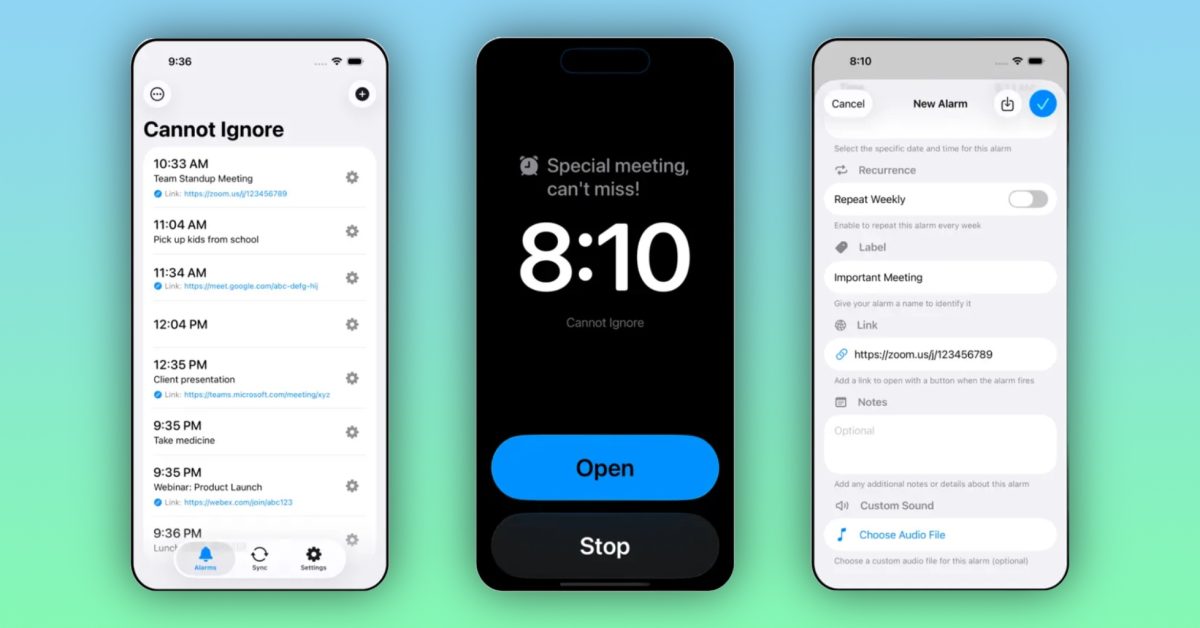
Apple introduced full-screen alarms for reminders in iOS 26.2. Cannot Ignore, an independent app highlighted in a weekly indie-app column, builds on that feature by offering full-screen alarms for calendar events as well as reminders. Users can choose to sync entire calendars or pick individual events or reminders to receive full-screen notifications. The app also honors travel time when available, so alarms can trigger at the moment a user needs to leave for an in-person appointment. Custom alarm sounds can be assigned to different events or calendars, and the alarm interface can surface links included with calendar events — for example, opening a meeting URL directly from the alarm. Cannot Ignore is distributed through the App Store for a one-time price of $0.99, with no ads or additional in-app purchases, and requires devices running iOS 26 or later.
Why it matters
- Brings more prominent, full-screen alerts to calendar events, reducing the chance of missed meetings or appointments.
- Selective calendar syncing lets users limit alarms to work or personal calendars, reducing notification noise.
- Travel-time-aware alerts help users leave at the appropriate moment for in-person events rather than just before an event starts.
- Direct access to event links from the alarm saves steps when joining online meetings.
Key facts
- Apple added full-screen alarms for reminders in iOS 26.2.
- Cannot Ignore extends full-screen alarm functionality to calendar events and reminders.
- Users can sync entire calendars or individual events/reminders to control which items generate full-screen alarms.
- The app takes travel time into account to trigger departure alarms for in-person events.
- Custom alarm sounds can be assigned to different events or calendars.
- Full-screen alarms created by the app can surface links from calendar events, enabling direct access to meeting URLs.
- Cannot Ignore is available on the App Store for $0.99.
- The app is offered without ads or additional in-app purchases.
- Requires iOS 26 or later to run.
What to watch next
- Whether the developer expands platform support or adds deeper integrations with third-party calendar services — not confirmed in the source.
- How users respond to the interface and whether demand leads to additional customization options — not confirmed in the source.
Quick glossary
- Full-screen alarm: A notification that takes over the device screen to demand immediate attention, often used for important reminders or alerts.
- Calendar sync: The process of connecting an app to one or more calendar feeds so events and details appear within that app.
- Travel time (calendar): A calendar feature that estimates and reserves time needed to travel to an event, allowing notifications to trigger when it’s time to leave.
- In-app purchases: Paid content or features unlocked within an app after download, often used for subscriptions, upgrades, or consumables.
Reader FAQ
How much does Cannot Ignore cost?
The app is sold for $0.99 on the App Store.
What iOS version is required?
Cannot Ignore requires devices running iOS 26 or later.
Does the app include ads or additional in-app purchases?
No — the app is offered without ads or extra in-app purchases.
Who developed Cannot Ignore?
not confirmed in the source
Just unwrap new AirPods Pro? Here are the must-try features Chance Miller Dec 26 2025 APPS INDIE APP SPOTLIGHT Indie App Spotlight: ‘Cannot Ignore’ brings full screen alarms to your…
Sources
- Indie App Spotlight: ‘Cannot Ignore’ brings full screen alarms to your calendar and more
- Cannot Ignore – Super Alarms – App Store – Apple
- iOS: how can I disable calendar alerts? – Ask Different
- Automatically set real iOS alarms for calendar events
Related posts
- Hochul signs New York law requiring warning labels on addictive social apps
- Just unwrapped a new iPhone? My favorite MagSafe accessories guide
- 9to5Mac Weekly Roundup: iPhone Fold, iPhone Air 2, and iPhone 18 Rumors