
TL;DR
Desktop Classic System (DCS) is a hand-built Debian 13 'Trixie' spin that uses a strictly configured MATE 1.26 setup to deliver a spatial, Classic Mac–style desktop. It ships as a ZIP of files for a FAT32 USB key (UEFI-only), is intentionally minimal, and is aimed at users who prefer a spatial file and window model.
What happened
A project calling itself the Desktop Classic System (DCS), created by someone using the handle Mycophobia, repackages Debian 13 'Trixie' with a heavily curated MATE 1.26 configuration to recreate a spatial, old-school desktop experience. Rather than providing a conventional ISO, the distribution is offered as a ZIP whose contents are intended to be written to a blank FAT32 USB volume; that approach requires UEFI firmware to boot and complicates testing in virtual machines. The environment is deliberately spare: no bundled extras such as Firefox, a mostly empty top panel with a single Brisk menu, no maximize/minimize controls or edge snapping, and a focus on a spatial file metaphor where folder windows remember position and size. The Reg testers ran DCS on a modern Dell XPS 13 and an older ThinkPad W520 (the latter needing legacy Nvidia 390-series support on older kernels); performance was slow to start on the ThinkPad but responsive afterward. Installing a browser was accomplished by enabling the Mozilla Debian repo and using apt.
Why it matters
- Revives a rare 'spatial' desktop paradigm that contrasts with mainstream, auto-arranging interfaces.
- Demonstrates a minimalist, opinionated approach to a current Debian base without extra applications.
- Distribution method (ZIP for FAT32, UEFI-only) limits out-of-the-box testing and broader adoption.
- Highlights enduring user demand for alternative desktop metaphors and more configurable UI choices.
Key facts
- Project name: Desktop Classic System (DCS); creator uses the handle Mycophobia.
- Base: Debian 13 'Trixie' with stock MATE 1.26, heavily customized for spatial operation.
- Distribution: supplied as a ZIP of files to copy onto a blank FAT32 USB volume; no ISO image provided.
- Boot requirements: UEFI firmware is necessary; simple file copy does not make it BIOS-bootable.
- System footprint: about 6 GB on disk and idles under roughly 800 MB of RAM.
- UI details: single Brisk menu, minimal top panel, no maximize/minimize controls, no window edge snapping.
- Window features: includes a 'roll up' (window shade) control and an 'Always On Visible Workspace' pin option.
- Tested hardware: ran on a Dell XPS 13 and a ThinkPad W520 (the latter requires Nvidia 390-series driver support on older kernels).
- Adding software: testers enabled the Mozilla Debian repo with extrepo and installed Firefox via apt.
What to watch next
- Whether the project will offer a traditional ISO image and legacy BIOS boot support (not confirmed in the source).
- If maintainers will polish global-menu integration and other rough edges in MATE's configuration (not confirmed in the source).
- Potential community uptake among users who prefer spatial desktops or want a clean, minimal Debian base (not confirmed in the source).
Quick glossary
- Spatial desktop: A desktop metaphor where folders and windows preserve their on-screen location, size, and view state so users can rely on spatial memory to navigate.
- MATE: A desktop environment derived from GNOME 2, offering a traditional desktop layout and a set of core utilities.
- UEFI: A modern firmware interface that initializes hardware and launches operating systems, largely replacing legacy BIOS on newer machines.
- ISO image: A single-file archive of an optical disc or installation medium commonly used to distribute bootable operating system installers.
- Brisk menu: A lightweight application menu often used in MATE and other desktop environments as a compact alternative to multiple menus.
Reader FAQ
How is Desktop Classic System distributed?
As a ZIP file containing files to put on a blank FAT32 USB key rather than a standard ISO image.
Does DCS require UEFI or will it boot on BIOS systems?
It requires UEFI; the ZIP approach does not produce a traditional BIOS-bootable medium.
Is the distribution packed with applications like Firefox?
No — the distro is intentionally minimal. Testers added Firefox by enabling the Mozilla Debian repo and installing via apt.
Can I easily try DCS in a virtual machine?
The source notes that running it in a VM is significantly tricky due to the distribution method and UEFI requirement.
Who created DCS?
The project creator is identified by the handle Mycophobia.
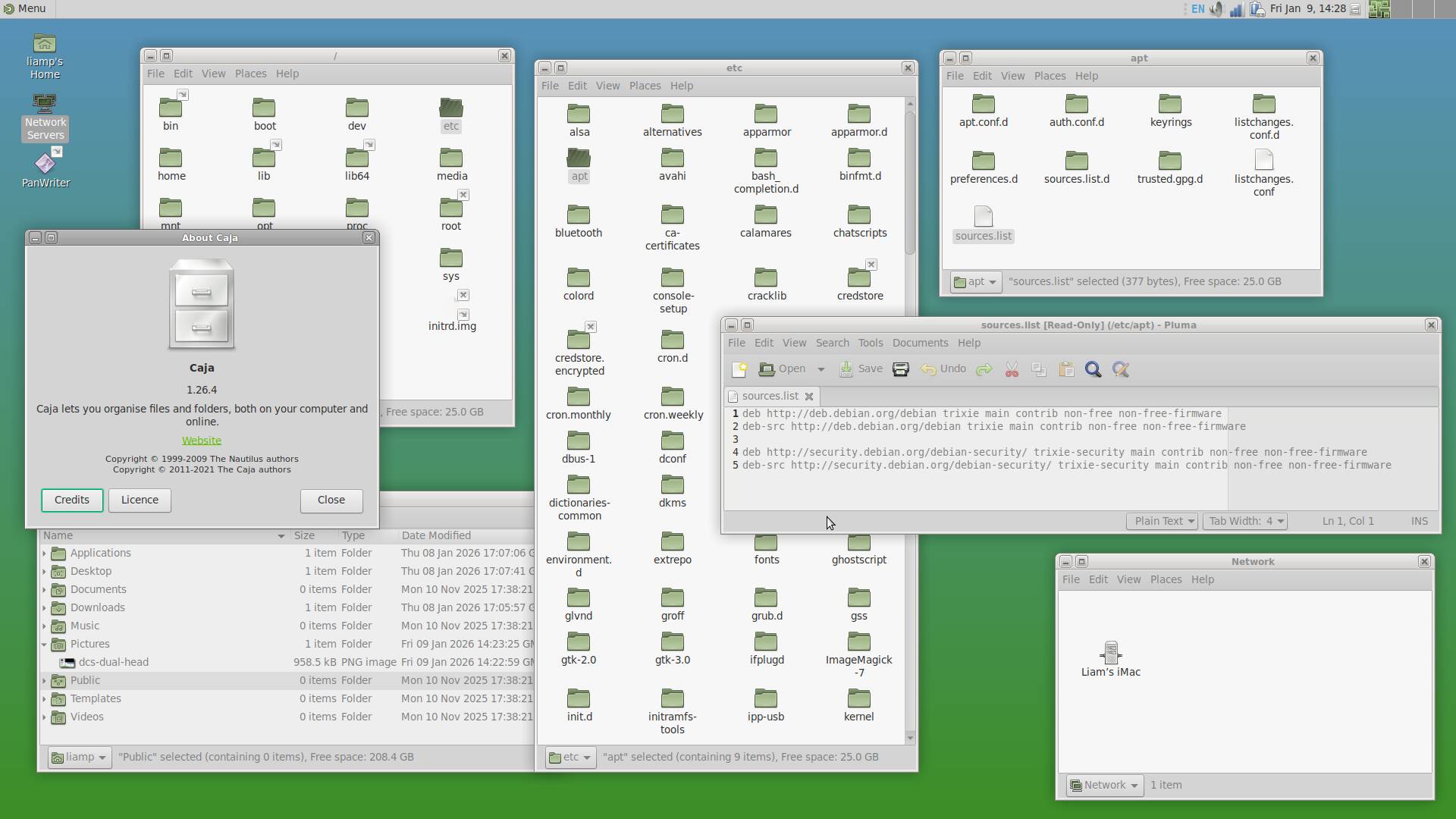
OSES Debian goes retro with a spatial desktop that time forgot Trixie plus a carefully configured MATE setup, and absolutely nothing else Liam Proven Fri 9 Jan 2026 // 16:33 UTC The Desktop Classic…
Sources
- Debian goes retro with a spatial desktop that time forgot
- Desktop Classic System wants to bring some classic Mac …
- Debian 13 'Trixie' Base, Modern Tools & A Fresh Installer
- Debian 13 "trixie" released
Related posts
- Anker’s AeroFit Pro 2 earbuds discounted $30 at launch with promo code
- Nimble’s Champ Stack 10K: a 10,000mAh power bank designed to snap apart
- CES 2026 flooded with urine, blood, sweat and saliva health tech