
TL;DR
Framework’s 16-inch model brings a modular approach to laptop graphics with a user-replaceable RTX 5070 module and six hot-swappable expansion slots. The design delivers a strong color-accurate 165 Hz display and respectable gaming performance, but the system is pricey and has some ergonomic and component limitations.
What happened
Framework’s Laptop 16, already designed around repairability, now supports a discrete, user-replaceable graphics module — including an Nvidia RTX 5070 option — that snaps in and out without major disassembly. The reviewer swapped the mainboard and graphics module, describing the process as thoughtfully engineered: spacers, touchpad, and keyboard remove without screws; a metal shield beneath requires 16 screws to remove for deeper upgrades; and the graphics module itself releases with three hidden screws. The laptop keeps six hot-swappable expansion ports and gains an extra USB-C on the graphics module for up to seven total ports. Hardware highlights include a 2560 × 1600, 165 Hz IPS panel with strong color coverage and 480 nits peak brightness, per-key RGB keyboard, two stacked M.2 storage slots (2280 on top, 2230 underneath), and full USB-C power via a 240 W GaN charger. Gaming is solid at native resolutions for many titles, but the RTX 5070 module is limited to 8 GB of VRAM and raises the system cost significantly.
Why it matters
- A user-replaceable discrete GPU challenges the long-standing assumption that laptop graphics are permanently soldered, opening new paths for upgradability.
- Modular design supports repairability and component replacement, which could reduce device turnover and e-waste for some buyers.
- The ability to remove the graphics module offers a practical way to trade peak performance for improved battery life while traveling.
- Framework’s approach tests a different business model for premium laptops: paying a premium for future-proofing rather than raw out-of-the-box value.
Key facts
- Review score reported as 7 out of 10.
- Framework Laptop 16 includes six hot-swappable expansion slots and the graphics module adds a rear USB-C for up to seven ports.
- Display: 2560 × 1600 resolution, 165 Hz refresh rate, up to 480 nits brightness, 100% sRGB and 99% Adobe RGB coverage, average color error ~0.88.
- Chassis thickness cited at about 0.71 inches; per-key RGB keyboard present with three brightness levels.
- Storage: two stacked M.2 slots — top supports M.2 2280, bottom requires M.2 2230.
- Upgradable GPU option: Nvidia RTX 5070 graphics module with 8 GB of VRAM (module upgrade costs noted as $650 new or $699 for owners upgrading from the original Framework Laptop 16).
- Estimated starting price example after key upgrades: roughly $2,449 when adding certain CPU and GPU upgrades; Framework does not typically discount via third-party retailers.
- Gaming examples at high presets (no upscaling or ray tracing): Cyberpunk 2077 — 56 fps at 2560 × 1600 and 93 fps at 1920 × 1200; Black Myth: Wukong — 27 fps at 2560 × 1600 and 37 fps at 1920 × 1200.
- Battery: nearly nine hours in local video playback tests; roughly five hours under the reviewer’s typical daily work load.
- Power delivery runs entirely over USB-C; the included 240 W GaN charger must be used on both sides to reach full performance.
What to watch next
- Effectiveness and availability of future graphics-module options beyond the RTX 5070: not confirmed in the source.
- Whether Framework will expand keyboard-module choices (alternative layouts, larger macro keys): not confirmed in the source.
- Users’ real-world uptake of mainboard and graphics upgrades, and long-term repair experiences.
- Third-party retail availability or changes to Framework’s pricing strategy: not confirmed in the source.
Quick glossary
- Modular graphics module: A removable component that provides discrete GPU performance and can be replaced or upgraded without replacing the entire laptop.
- M.2 2280 / M.2 2230: Common form factors for SSDs: 2280 is 22 mm wide and 80 mm long, while 2230 is 22 mm by 30 mm, used where space is constrained.
- GaN charger: A power adapter using gallium nitride semiconductors, which can be smaller and more efficient than traditional silicon-based chargers.
- VRAM: Video RAM used by a GPU to store textures and frame buffers; more VRAM helps with higher-resolution textures and demanding workloads.
- Hot-swappable port: A user-replaceable port or module that can be changed without powering down the device or opening the full chassis.
Reader FAQ
Can you install the RTX 5070 yourself?
Yes — the review describes the graphics module as user-replaceable with three hidden screws and snaps into place; swapping it does not require full disassembly.
How much does the RTX 5070 upgrade cost?
The review lists the graphics module cost as $650 when purchased new with the laptop, or $699 as an upgrade for existing Framework Laptop 16 owners.
What kind of battery life can you expect?
Reviewer tests showed close to nine hours of local video playback and about five hours under typical daily work; real-world results will vary.
Are keyboard customization options fully developed?
The reviewer says the keyboard customization is interesting but still feels limited and not fully realized.
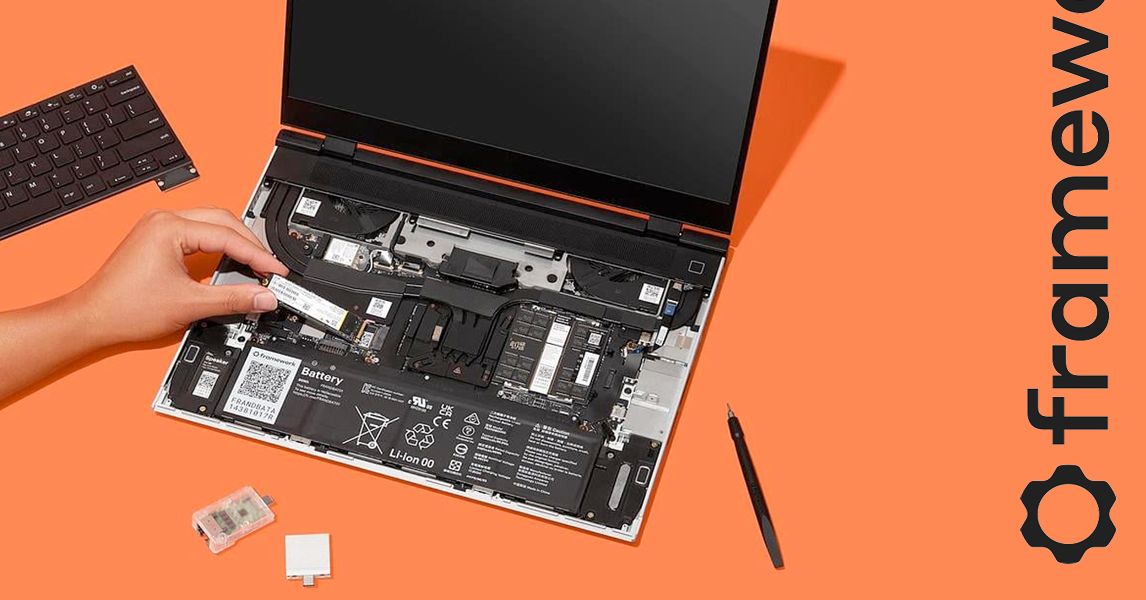
LUKE LARSEN GEAR JAN 3, 2026 8:00 AM Review: Framework Laptop 16 (RTX 5070) With upgradable graphics, the Framework Laptop 16 achieves what PC nerds have only ever dreamed of….
Sources
- Framework Laptop 16 (RTX 5070) Review: A Dream Come True
- Press reviews for the new Framework Laptop 16 are live!
- Framework Laptop 16 (RTX 5070) review: Yes, you can …
- Framework 16 gen2 reviews
Related posts
- CES 2026 roundup: major announcements, gadgets and innovations
- CES 2026 preview: why Lego’s brick-focused Smart Play is worth watching
- Oura versus Whoop: consumer blood panels, costs, speed, and findings