
TL;DR
Google has added a new built-in 'Snapseed Camera' to the iOS version of Snapseed, offering preset film-style filters and a skeuomorphic viewfinder. The feature arrived with version 3.11 and is available via Control Center or Camera Control on compatible iPhones.
What happened
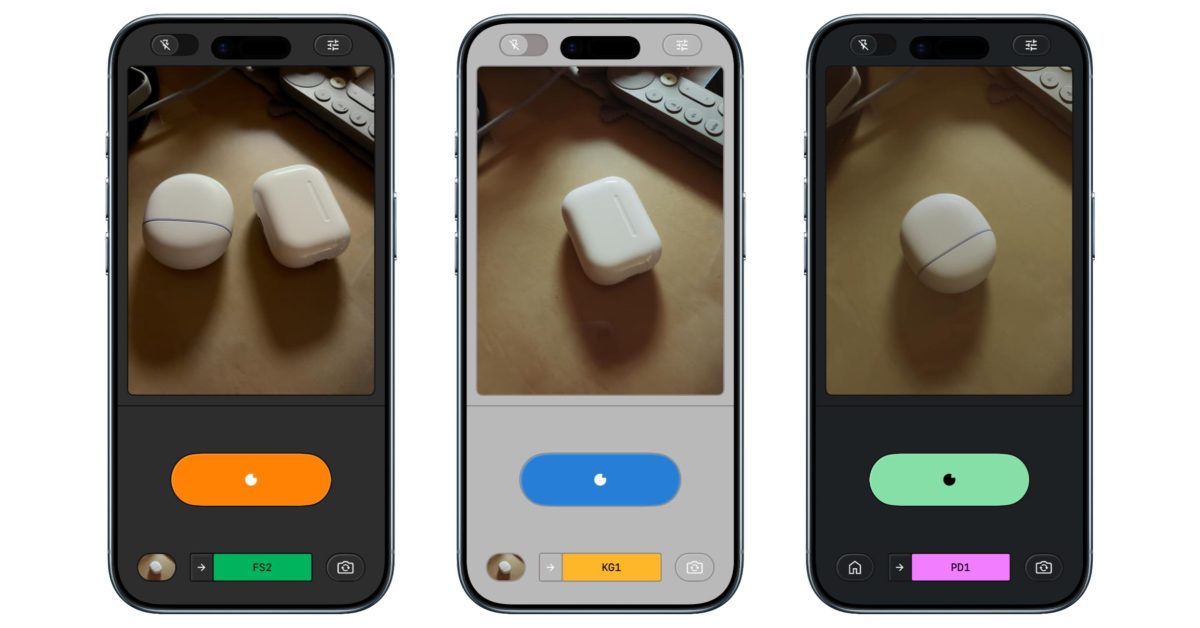
Snapseed’s iPhone app received a new in-app camera mode dubbed 'Snapseed Camera' as part of the app’s recent 3.11 release. The mode centers on film-inspired shooting with a range of named presets modeled on classic stocks — from Kodak and Fuji to Agfa and Polaroid — plus a Technicolor-style option. The camera shows the chosen style and intensity in the viewfinder, though film grain is only added after a photo is taken. The interface leans into skeuomorphic design, including a rewind animation when switching films. Users can also access previously saved Looks and Edits while shooting. Settings include six color themes and standard flash and camera-facing controls. On supported iPhones the camera can be launched by adding a Snapseed shortcut to Control Center or enabling Camera Control in Settings > Camera. The update continues a run of regular iOS updates for Snapseed; an Android equivalent has not appeared.
Why it matters
- Provides iPhone users a native, free shooting mode that combines camera capture with Snapseed’s editing pipeline.
- Built-in film presets and saved Looks streamline producing retro-style photos without third-party apps.
- The update underscores Google’s continued focus on the iOS Snapseed experience, while Android users remain without the new camera.
- Skeuomorphic UI and film emulation may appeal to photographers seeking nostalgic, app-based analog looks.
Key facts
- The Snapseed Camera launched with Snapseed version 3.11.
- Presets include film-inspired options such as Kodak Portra (KP1, KP2), Kodak Gold (KG1), Kodak E200 (KE1), Fuji Superia (FS1, FS2), Fuji Pro (FP1), Agfa (AG1, AS1), Polaroid 600 (PD1), and a Technicolor-style filter (TC1).
- Viewfinder previews style and strength, but grain is applied only after capture.
- The camera interface features a skeuomorphic look and a rewind animation when switching films.
- Users can access saved Looks and Edits while using the Snapseed Camera.
- Settings include six color themes: Editor, Dusk, Negative, Steel, Haze, and Depth.
- Launch options on compatible iPhones: add a Snapseed shortcut to Control Center or enable Camera Control via Settings > Camera.
- The Snapseed update is currently iOS-only; no Android update is available according to the source.
What to watch next
- Whether Google will bring the Snapseed Camera or equivalent features to Android — not confirmed in the source.
- If Google expands the preset roster or adds more capture-time controls in future updates — not confirmed in the source.
- How photographers respond to the grain-after-capture workflow and the skeuomorphic UI in everyday shooting — not confirmed in the source.
Quick glossary
- Skeuomorphic: A design approach that imitates real-world materials or objects in a digital interface to make features feel familiar.
- Preset film filter: A predefined combination of color, contrast, and other adjustments intended to emulate the look of a particular film stock.
- Control Center (iOS): A quick-access panel on iPhone that provides shortcuts to system functions and supported apps.
- Camera Control (iOS): A setting that allows third-party apps to integrate with the system Camera app or be used as accessible camera shortcuts.
Reader FAQ
Is the Snapseed Camera free?
Yes. The source describes the Snapseed Camera as entirely free.
How do I open the Snapseed Camera on my iPhone?
Add a Snapseed shortcut in Control Center (search for Snapseed) or use Camera Control via Settings > Camera on newer iPhone models, per the source.
Does the viewfinder show the final grain effect?
No. The viewfinder renders the chosen style and strength, but grain is applied only after capture.
Is the Snapseed Camera available on Android?
Not confirmed in the source — the article states there is still no updated version for Android.
Google in 2026: What to expect [Video] Damien Wilde Jan 2 2026 APPS & UPDATES SNAPSEED Google updates Snapseed for iPhone with retro film camera Abner Li | Jan 5 2026…
Sources
- Google updates Snapseed for iPhone with retro film camera
- Snapseed: Photo Editor – App Store – Apple
- Snapseed Updated With Film-Inspired Filters and …
- Google's forgotten iPhone photo editor just got a huge update
Related posts
- Brave’s Rust adblock engine refactor saves 75% memory with FlatBuffers
- iPadOS 26 Brings Apple Journal to iPad – A Daily Writing Companion
- 9to5Mac Daily: January 5, 2026 — Apple in January and iOS 27 rumors