
TL;DR
Amazon’s Bee is a wearable that records conversations, segments them, and provides summarized sections in a companion app. Early testing found the hardware simple to use and the app feature-rich, but the product lacks multi-speaker labeling and discards audio after transcription.
What happened
We tested an Amazon Bee review unit and found basic operation straightforward: a single button toggles recording and app settings let you map double-press and press-and-hold gestures to functions like bookmarking, processing a conversation or leaving a voice note. Bee records conversations, transcribes them, and breaks recordings into color-tinted segments with summaries and tappable transcriptions for each section. The app includes features for voice notes, a memories view for past days, a “Grow” area that offers insights as it learns, and a “facts” page where you can confirm or add personal details. Bee integrates with Google services to suggest follow-up tasks from a recorded interaction, such as connecting on LinkedIn or researching a product. Hardware issues in our session included a flimsy sports band that detached twice; a clip-on pin was felt to be sturdier. Amazon says more features will arrive over the coming year.
Why it matters
- Bee demonstrates a consumer-oriented approach to always-available AI that ties recorded conversations to tasks and personal memory.
- The device’s summary-by-segment model is a different UX from raw transcripts and could change how people review meetings or casual conversations.
- Privacy and social norms loom large: the device lights a green indicator when recording, but the idea of routine ambient recording may require cultural adjustments.
- Hardware reliability matters for wearables; a band that detaches undermines utility for everyday use.
Key facts
- A single hardware button starts and stops recording; gestures can be configured in the companion app.
- Bee transcribes audio, segments conversations into summarized sections, and uses colored backgrounds to differentiate segments.
- Tapping a segment reveals the exact transcription for that part of the conversation.
- Speaker labeling is limited: you can mark if you were the speaker on a segment, but Bee lacks the per-speaker labeling found in some pro transcription tools.
- After transcription, Bee discards the original audio, so users cannot play back recordings to verify accuracy.
- The app supports voice notes and includes a memories view, a Grow section for insights, and a facts page to store personal details.
- Bee integrates with Google services to create follow-up tasks based on recorded conversations (example: suggest connecting on LinkedIn).
- Bee is not always listening by default; you should ask permission to record others and a green light indicates active recording.
- In testing, the provided sports band detached twice while the wearer was mostly stationary; the clip-on pin felt sturdier.
- Amazon plans to ship additional Bee features over the coming year.
What to watch next
- Whether Amazon will add multi-speaker labeling or improve speaker identification — not confirmed in the source.
- If future updates will allow audio retention or playback for verification, or whether deletion after transcription will remain the policy — not confirmed in the source.
- Consumer traction and social acceptance of routine conversational recording; Bee’s uptake will influence Amazon’s roadmap.
Quick glossary
- Transcription: Converting spoken language into written text.
- Segmentation: Breaking a recording into smaller thematic sections for easier review and summarization.
- Wearable: A device designed to be worn on the body that provides computing or sensing functions.
- Voice note: A short recorded audio message saved for personal reference.
- AI assistant: Software that uses artificial intelligence to perform tasks, answer questions, or interact with users via voice or text.
Reader FAQ
Does Bee keep original audio files after transcription?
No — Bee discards the audio after transcribing, so you cannot play back the original recording.
Can Bee automatically label multiple speakers?
Not fully; you can tap a segment to confirm if you were the speaker, but Bee lacks the comprehensive multi-speaker labeling found in some professional transcribers.
Is Bee always listening in the background?
No — Bee is not always listening by default. You should ask permission before recording, and a green light indicates active recording.
Is Bee intended for professional users and workflows now?
The source indicates Bee is not yet positioned as a professional tool and that more features are expected later this year.
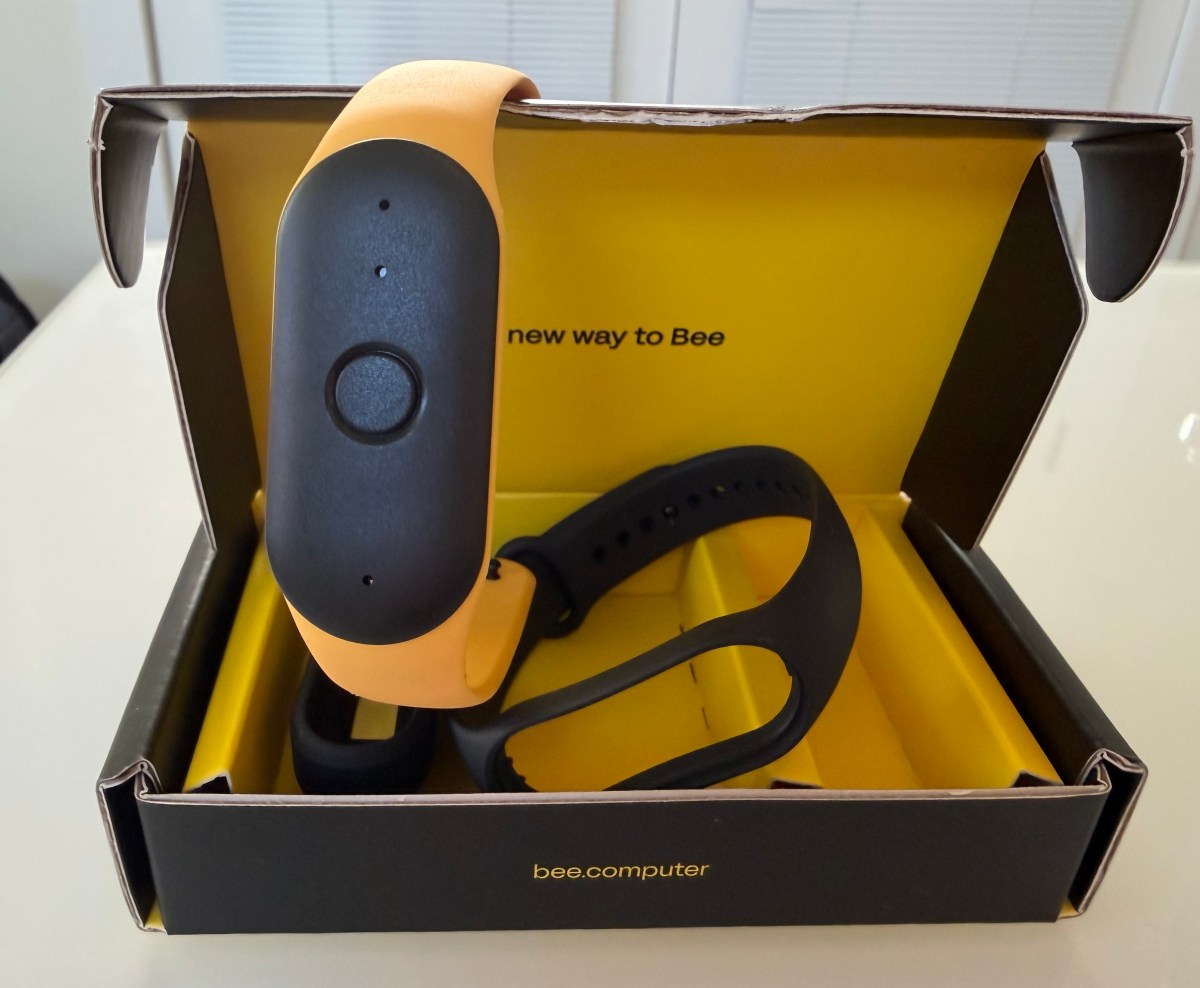
In early tests with a review unit of Bee, we found the device itself was easy to use. It’s just a press of a button to turn recording on or…
Sources
- Hands-on with Bee, Amazon’s latest AI wearable
- Bee – Your new wearable personal AI
- How wearable AI device Bee is evolving at Amazon
- Amazon has big hopes for wearable AI — starting with this …
Related posts
- WorkJourney: AI-powered private work journal for employees and managers
- Why Amazon Bought Bee: Bringing a Wearable AI Companion Beyond Alexa
- Fabrice Bellard’s ts_zip: LLM-based text compressor promising high compression ratios