
TL;DR
The author finds Galaxy AI features technically capable but unintuitive; instead, a One UI addition called the Now Bar proved unexpectedly useful. The Now Bar surfaces sports scores, turn-by-turn cues and media controls on the lock screen in a compact, unobtrusive way.
What happened
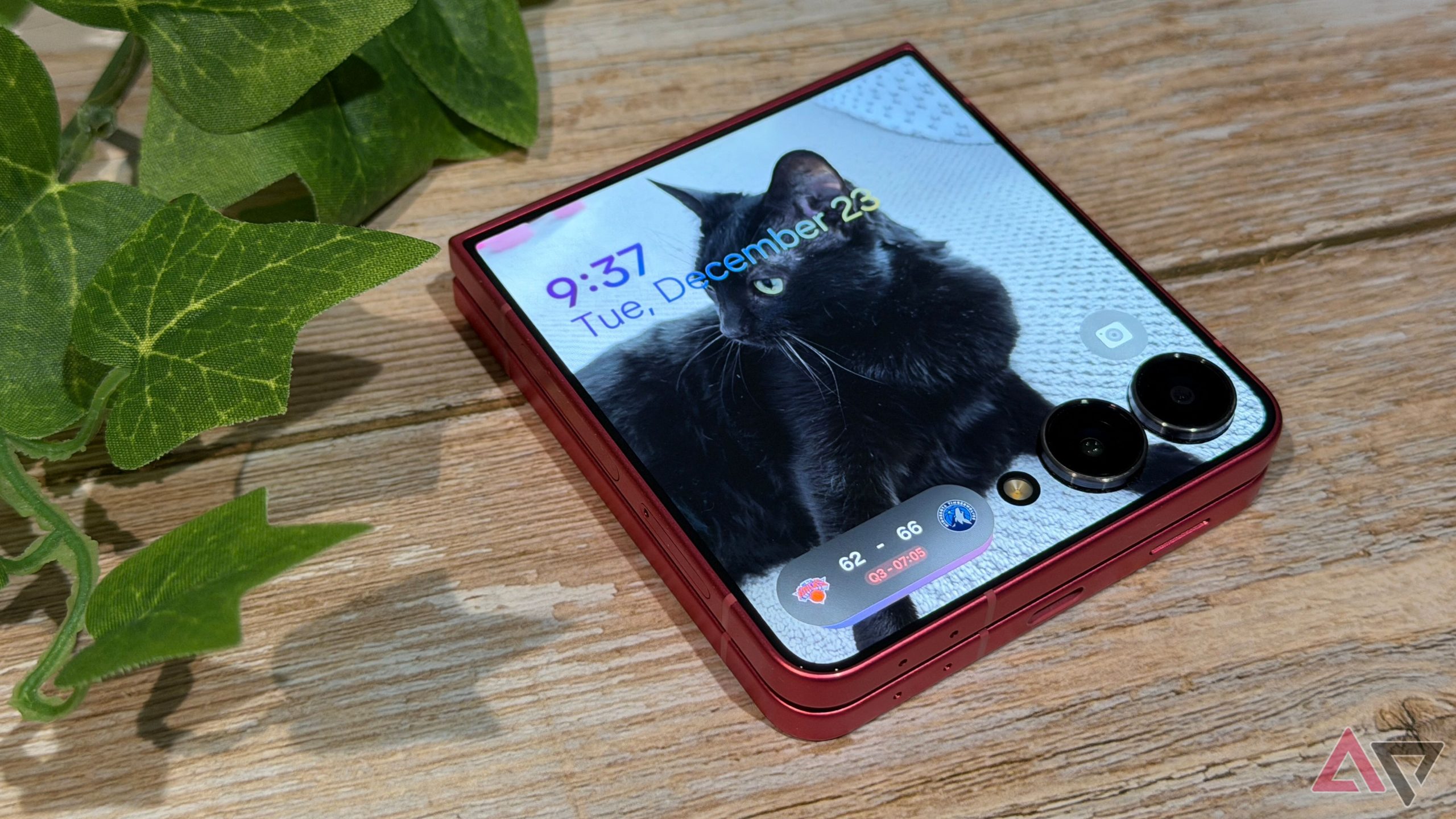
Stephen Radochia says he’s not a fan of Galaxy AI’s user experience — the tools work but demand too much active participation. During the same software cycle, Samsung introduced a One UI element called the Now Bar that he initially assumed was mainly a vehicle for Galaxy AI content. After using it, he found the Now Bar more practical than expected. It pulls in followed sports teams from the Google app and displays scores on the lock screen, helps with turn-by-turn navigation when walking, and offers media controls that don’t clutter the screen. On a Galaxy Z Flip 7 the Now Bar also improves the cover-screen experience. The behavior is tuned to avoid accidental input: interactions require a double-tap while the phone is locked and a single tap when unlocked. Radochia notes he misses the Now Bar when testing other phones and appreciates Samsung’s refinements this year.
Why it matters
- Provides quick updates (scores, navigation cues, media) without unlocking the phone, streamlining common tasks.
- Improves usability on devices with small external displays such as the Galaxy Z Flip 7’s cover screen.
- Reduces friction for glanceable information, which can save battery and lower distraction compared with constantly opening apps.
- Demonstrates that practical UI changes can matter more to some users than flashy AI features.
Key facts
- The author dislikes Galaxy AI’s overall experience despite its functionality.
- Now Bar is a One UI software addition Samsung released this year.
- Sports scores shown in the Now Bar come from teams the user follows in the Google app.
- Now Bar displays turn-by-turn navigation cues on the lock screen and is easier to use while walking than while driving.
- Media controls in the Now Bar let users pause or skip tracks without unlocking the phone; Apple Music worked well in the author’s testing.
- When the phone is locked, Now Bar interactions require a double-tap; a single tap controls playback when unlocked.
- The Now Bar is unobtrusive and does not fill the entire lock screen, according to the author.
- The author misses the Now Bar when using other phones and says Samsung improved the feature this year.
What to watch next
- Whether Samsung expands Now Bar functionality or integrates it more deeply with Galaxy AI: not confirmed in the source.
- How widely Samsung rolls out the Now Bar across models and carriers: not confirmed in the source.
Quick glossary
- Now Bar: A One UI interface element that surfaces compact, card-style information on the lock screen such as sports scores, navigation cues and media controls.
- One UI: Samsung’s custom Android skin that modifies the interface and adds features on Galaxy devices.
- Galaxy AI: Samsung’s branded set of artificial intelligence features and experiences integrated into recent Galaxy devices and software.
- Lock screen media controls: Playback controls available on a device’s lock screen that let users pause or skip audio without unlocking the phone.
Reader FAQ
Why does the author dislike Galaxy AI?
He finds it unintuitive and says it requires too much active participation from the user rather than the AI adapting to help.
What does the Now Bar do?
It shows compact cards on the lock screen for items like sports scores (from followed teams), turn-by-turn directions and media controls.
Does the Now Bar require Galaxy AI to work?
The author initially assumed it was tied to Galaxy AI, but found it useful for practical tasks independent of AI-focused content.
Is the Now Bar available on all Samsung phones?
not confirmed in the source
I hate Galaxy AI, but this one Samsung feature won me over By Stephen Radochia Published 4 minutes ago When Mitsubishi made your first cellphone, you know you’ve been around…
Sources
- I hate Galaxy AI, but this one Samsung feature won me over
- Re: The Now Bar sucks! – Page 3
- One UI 7's "Now Bar" realizes Samsung's vision for Galaxy …
- Galaxy AI is a scapegoat for Samsung's ho-hum user …
Related posts
- Dutch hobbyists build low-cost next-gen Amiga mainboard for AmigaOS4, MorphOS
- Setting Up iPhone and Android Phones for Elderly Loved Ones — Practical Steps
- I won’t set up a new Android phone without installing Pixel Search first