
TL;DR
QNX has released an initial self-hosted Developer Desktop running on QNX 8.0 that supports building code directly on the target. The first release is delivered as a QEMU image for Ubuntu and includes a desktop, development toolchain, editors, samples and ports from the QNX open-source portal.
What happened
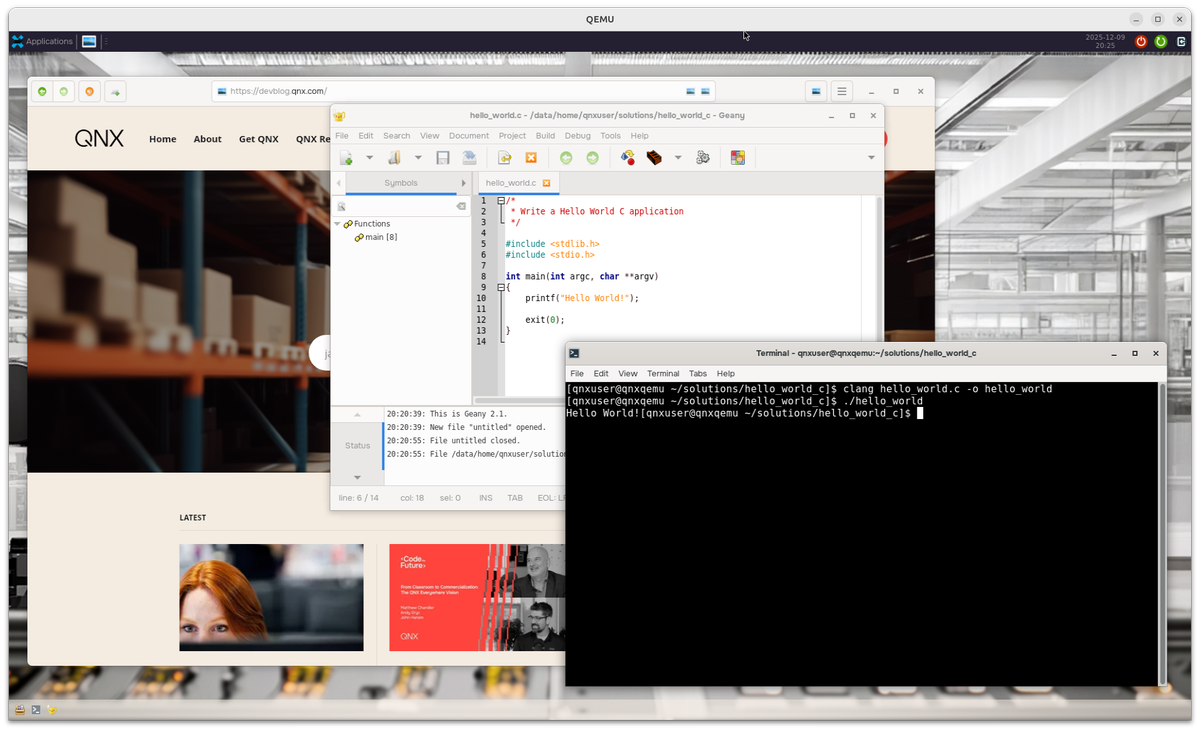
QNX published the first release of a self-hosted Developer Desktop for QNX 8.0, offering a full desktop environment and on-target compilation rather than requiring cross-compilation. The initial distribution is provided as a QEMU virtual machine image intended to run on Ubuntu 22.04 or 24.04. The desktop bundles a customizable XFCE session running on Wayland, standard build tools (clang, gcc, clang++, Python, make, cmake, git), several editors and IDE ports (Geany, Emacs, Neovim, vim), a file manager (Thunar), a web browser, preloaded sample programs (Hello World in C, C++, Python, plus GTK and OpenGL ES demos), and a terminal. The image is available through QNX Software Center under the "QNX SDP 8.0 Quick Start Target Image for QEMU" listing; the install yields image files commonly placed in ~/qnx800/images. Documentation and a README with boot instructions are included in the package, and community support is available via QNX Discord and Reddit.
Why it matters
- On-target compilation removes the need for a separate cross-compilation toolchain, simplifying build workflows.
- Bundling common ports and development tools lowers the barrier for new QNX developers to start building and testing on QNX.
- Preloaded Linux-ported libraries and examples aim to make porting Linux applications to QNX 8.0 easier.
- Delivering the environment as a VM image makes it accessible for experimentation without native hardware changes.
Key facts
- Initial release is provided as a QEMU virtual machine image targeted for Ubuntu 22.04 or 24.04.
- Desktop environment is XFCE running on Wayland and is customizable.
- Included developer toolchain: clang, gcc, clang++, Python, make, cmake, git, and related build tools.
- Ports of editors/IDEs included: Geany, Emacs, Neovim, and vim.
- File manager included: Thunar; a web browser and terminal are also provided.
- Preloaded sample code includes Hello World in C, C++, and Python, plus GTK and OpenGL ES demos.
- QNX Open-source Dashboard hosts the ecosystem of ports referenced; the portal lists over 1,400 ports with more than 600 unique ports.
- The image is distributed via QNX Software Center as "QNX SDP 8.0 Quick Start Target Image for QEMU" and typically appears in ~/qnx800/images after installation.
- Documentation: README.md in the qemu directory and a PDF under ./qemu_qsti/docs provide setup, dependency and troubleshooting instructions.
- Community support channels noted: QNX Discord and the r/qnx subreddit.
What to watch next
- Planned future releases: QEMU images for Windows and macOS (timing not specified).
- Planned native images for x86 and a native Desktop image for Raspberry Pi.
- Upcoming enhancements: expanded documentation, additional samples, stability improvements, and features to support CI jobs.
- Community feedback and iterative updates from QNX — specifics and schedules are not confirmed in the source.
Quick glossary
- QNX: A commercial real-time operating system designed for embedded systems and devices.
- Self-hosted compilation: Building software directly on the target operating system or device, rather than using a separate cross-compiler on a different host.
- QEMU: An open-source machine emulator and virtualizer commonly used to run operating systems in virtual machines.
- Cross-compilation: Compiling software on one platform to run on a different target platform or architecture.
- Wayland: A protocol and set of libraries for a modern display server interface, intended to replace X11 in many Linux-based desktops.
Reader FAQ
How do I obtain the QNX Developer Desktop image?
Available from QNX Software Center: search the Available tab of Manage Installation for "QNX SDP 8.0 Quick Start Target Image for QEMU" and install (requires a free QNX license).
What host OS is required to run the image?
The initial release runs as a QEMU VM on Ubuntu; the source lists Ubuntu 22.04 or 24.04 as requirements.
Are native Windows or macOS images available now?
Not confirmed in the source — QNX says QEMU images for Windows and macOS are planned for future releases.
Is this release production-ready?
The release is described as an initial version that may be rough around the edges; stability improvements are planned in future updates.
NEWS QNX Self-Hosted Developer Desktop — Initial Release Try out the initial release of the QNX Developer Desktop — a self-hosted development environment for QNX. No more cross-compilation! JohnAtQNX 11…
Sources
- QNX Self-Hosted Developer Desktop
- QNX Self-Hosted Developer Desktop Brings QNX 8.0 To A …
- Free Access to QNX Hypervisor with QNX Everywhere
- QNX Developer Blog
Related posts
- Migrating web analytics: moving ten years of Matomo data to Umami
- T-Ruby brings inline type syntax to Ruby and generates standard RBS
- Exe.dev presents terse landing page with SSH prompt and basic navigation