
TL;DR
A user installed Asahi Linux on a MacBook Air M2 and ran the Sway window manager on a Fedora minimal install. They detail installer steps, tweaks to use the display area around the notch, switching to Waybar, daily-use impressions and remaining hardware limitations.
What happened
The author bought a MacBook Air M2 and installed Asahi Linux using the project’s installer one-liner. To conserve storage while running the Sway tiling window manager, they installed Fedora minimal and used nmcli to connect to Wi‑Fi. The writeup lists the packages installed, cloning and adapting a personal dotfiles repository, and several MacBook-specific tweaks. By enabling the previously-disabled notch area with a grubby kernel argument and setting the Sway bar height to 56px, they reclaimed top-screen space; they also adjusted i3status to read the Mac battery file and mapped the touchpad region to prevent the cursor entering the top bar. Later, the author replaced Swaybar with Waybar (noting a small performance tradeoff) and reports generally smooth performance, a strong touchpad experience, successful use of an ARM64 vendor SDK via unpacking, and battery life that dropped from 100% to 60% after about 4.5 hours of heavy use. Remaining issues include higher sleep-era battery drain, lack of video decode acceleration, and some USB/external-display quirks.
Why it matters
- Shows Asahi Linux can be used as a practical daily driver on M2 Mac hardware with a tiling window manager.
- Offers concrete configuration steps to reclaim screen area around the MacBook notch for Linux desktop bars.
- Demonstrates that some vendor ARM64 software can be adapted to run on Asahi Linux, expanding device use cases like line-scan photography.
- Highlights outstanding hardware and power-management gaps that still affect Linux on Apple Silicon.
Key facts
- The author purchased a 13.6" MacBook Air M2 16 GB / 256 GB model listed at $750 at time of writing.
- Asahi Linux installer was used via a one-liner; copying root.img and boot.img reportedly ran at about 150 KB/s and took hours.
- The author installed Fedora minimal and then set up Sway, installing packages including fish, alacritty, rofi, ruff, rclone, pavucontrol-qt, i3status, mako, pass, syncthing, maim, firefox, rustup, openssl-devel, ncdu, fd-find, and neovim.
- To enable use of the notch area they added grubby kernel args: apple_dcp.show_notch=1 and set the Sway bar height to 56px.
- i3status was reconfigured to show wireless, ethernet, battery (using path /sys/class/power_supply/macsmc-battery/uevent) and local time.
- The touchpad mapping was adjusted to prevent the mouse cursor entering the top bar (example uses an input map_to_region command).
- Around September 2025 the author switched from Swaybar to Waybar for visual reasons, noting a small performance cost.
- Under heavy use (high brightness and compiling), battery fell from 100% to 60% in about 4.5 hours; macOS battery life was reported as longer (~15 hours) by the author.
- Problems noted: increased battery drain during sleep, no hardware-accelerated video decoding, and some USB and external display quirks.
- For large photography data, the author used an external 4 TB Crucial X8 SSD due to the MacBook’s limited internal storage.
What to watch next
- Whether Asahi Linux will add official support for Apple chips newer than M2 is not confirmed in the source.
- Timing for kernel or driver updates that enable hardware-accelerated video decoding on Apple Silicon is not confirmed in the source.
- Plans or fixes to improve battery behavior during suspend/ sleep are not confirmed in the source.
Quick glossary
- Asahi Linux: A community project focused on porting Linux to Apple Silicon (ARM-based) Macs, including device drivers and installation tooling.
- Sway: A tiling Wayland compositor and drop-in replacement for the i3 window manager designed for the Wayland display protocol.
- Waybar: A configurable status bar for Wayland compositors that renders modules and icons and can be styled with CSS.
- nmcli: A command-line tool for controlling NetworkManager, used to list and connect to Wi‑Fi networks from a shell.
- grubby: A tool to manage kernel command-line options and bootloader entries on some Linux distributions.
Reader FAQ
Does Asahi Linux support the M2 MacBook Air?
Yes — the author installed Asahi Linux on an M2 MacBook Air and ran it with Sway.
Will this setup work on newer Apple Silicon chips?
Not confirmed in the source.
Is video hardware acceleration available on this setup?
The source reports no hardware acceleration for video decoding.
How is battery life under Linux compared to macOS?
Under heavy use (high brightness and compiling) the author observed battery drop from 100% to 60% in about 4.5 hours; macOS was reported to last longer.
Can vendor ARM64 software like an SDK be installed?
The author installed an ARM64 SDK by extracting a vendor-provided .deb with bsdtar after encountering issues with alien; details are specific to that package.
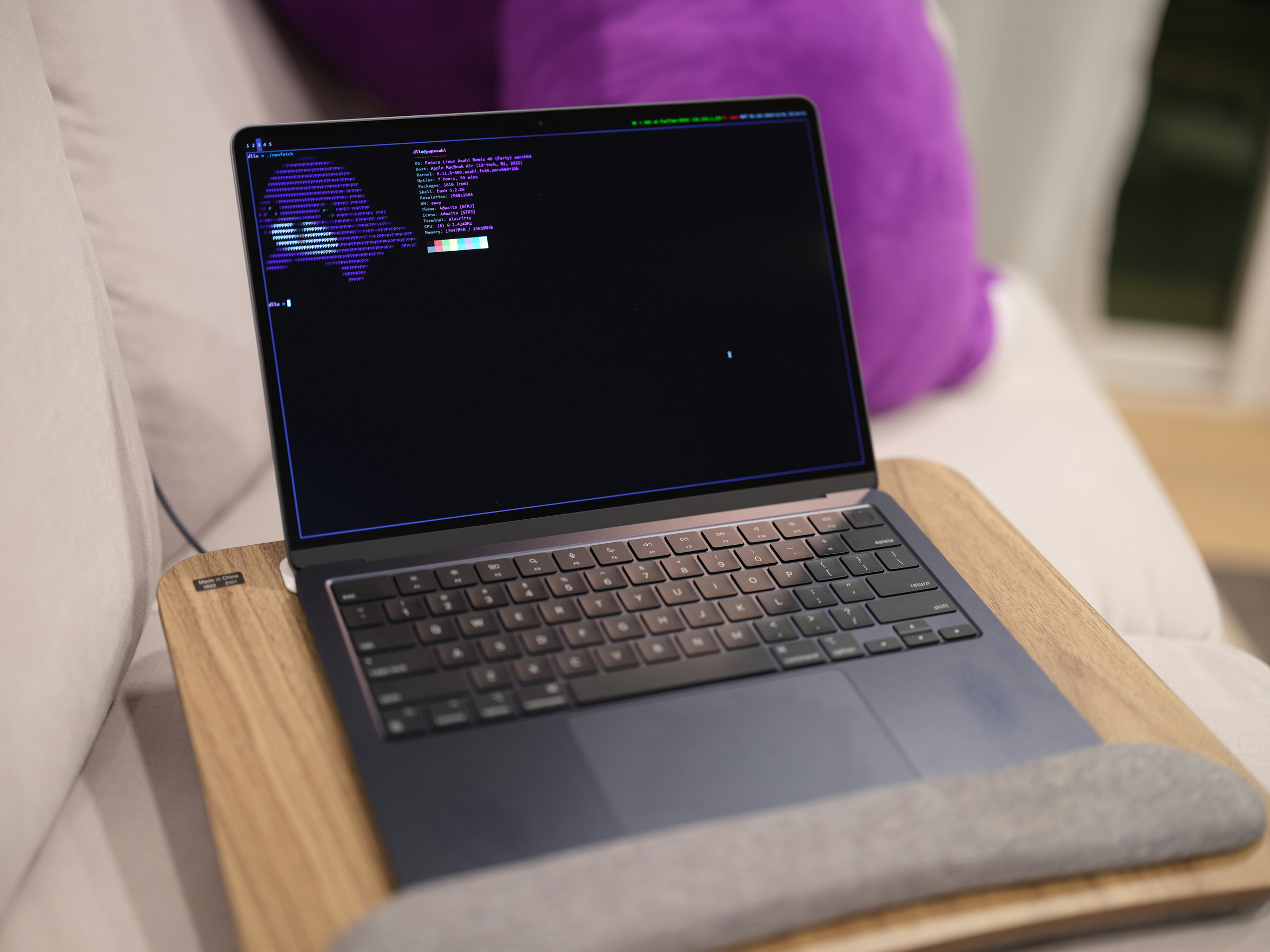
ASAHI LINUX WITH SWAY ON THE MACBOOK AIR M2 2024-12-01 I bought a MacBook Air M2. As of writing, it’s very affordable with the 16 GB RAM, 256 GB SSD,…
Sources
- Asahi Linux with Sway on the MacBook Air M2 (2024)
- Asahi Linux with Sway on the MacBook Air M2
- M2 Series Feature Support
- Asahi Linux
Related posts
- The 40 Best Movies to Stream on HBO Max Right Now — Wired Picks
- Five essential Mac apps I install right away on every new Mac setup
- Running Asahi Linux and Sway on a MacBook Air M2: setup and notes