
TL;DR
Recent advances in low-cost mini PCs, mesh VPNs like Tailscale, and terminal AI agents such as Claude Code have made running personal services at home far easier. One user reports a small, quiet $379 Beelink N150 running a suite of containerized apps managed by a CLI agent, making self-hosting practical for people who aren’t full-time sysadmins.
What happened
A convergence of cheaper, energy-efficient mini PCs, simple secure networking via Tailscale, and agentic command-line tools like Claude Code has lowered the friction of home self-hosting. The author replaced an M1 Mac mini setup with a Beelink Mini N150 (about $379) plus roughly a few hundred dollars for an 8TB NVMe SSD, installed Ubuntu Server 22.04 LTS, added Tailscale, and installed Claude Code on the box itself. Using the agent, they had the system create Docker and Docker Compose configurations, install services, put them behind a Caddy reverse proxy, set up persistence, automatic restarts, and basic security — all by describing desired outcomes rather than hand-editing YAML. The box now runs about a dozen-plus containerized services (Vaultwarden, Immich, Plex, Home Assistant, ReadDeck, Uptime Kuma and others) while using a few gigabytes of RAM and minimal CPU.
Why it matters
- Lowers technical barriers: agentic CLIs can generate and manage container and networking setups without manual YAML editing.
- Cost and power efficiency: small, inexpensive mini PCs can host many personal services with low resource use.
- Privacy and control: self-hosting lets users move data and core services off third-party hosted SaaS.
- Operational simplicity: Tailscale avoids complex port-forwarding, and simple monitoring (Uptime Kuma) can notify users without complex alerting systems.
Key facts
- Author used a Beelink Mini N150, paid about $379 for the device.
- The author added roughly 'a few hundred USD' more for an 8TB NVMe SSD.
- Installed Ubuntu Server 22.04 LTS, then Tailscale, and accessed the box via SSH.
- Claude Code was installed on the server and used to create Docker Compose files, install services, and configure a Caddy reverse proxy.
- Services run in separate containers and include Vaultwarden, Plex, Immich, Uptime Kuma, Caddy, Home Assistant, and ReadDeck.
- Vaultwarden (a Bitwarden-compatible server written in Rust) was used to replace the author’s previous password store after importing from iCloud/Keychain.
- Immich was used as a Google Photos replacement with mobile apps, local face recognition (described as slow), timeline and map views, and automatic uploads.
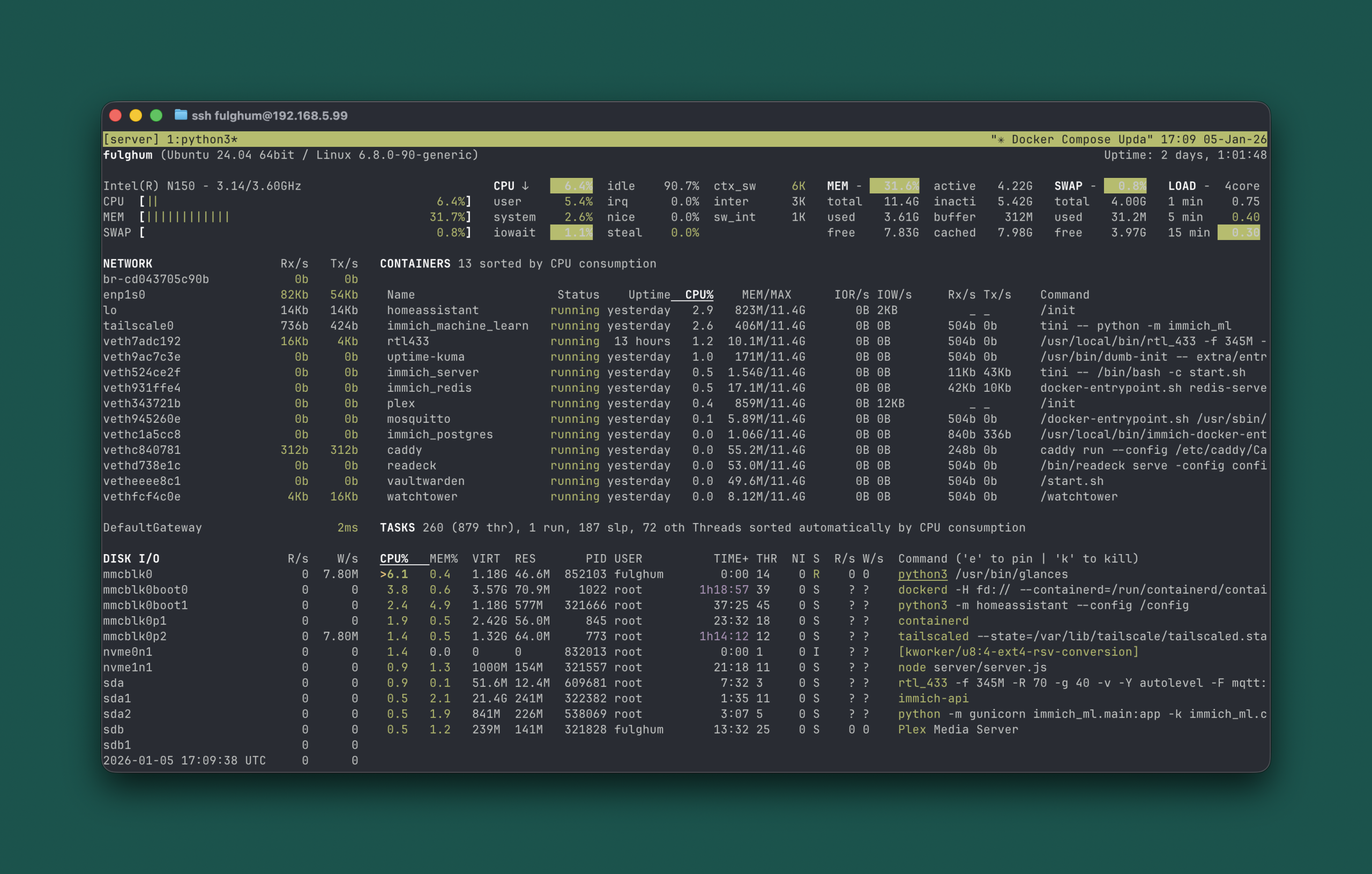
- The mini PC ran 13 services in containers while using about 4 GB of RAM and low CPU (example snapshot: ~6% CPU, ~32% memory usage).
- Lazydocker and Glances were used for terminal-based monitoring and management of containers and system utilization.
What to watch next
- Wider real-world adoption of agentic CLI tools like Claude Code among non-expert users: not confirmed in the source.
- How self-hosted media services and hardware-accelerated transcoding expectations evolve on low-cost mini PCs (Plex Pass was recommended for hardware transcoding): not confirmed in the source.
- Whether more user-friendly GUIs or agent integrations further reduce setup troubleshooting for new self-hosters: not confirmed in the source.
Quick glossary
- Claude Code: A command-line, agentic AI tool the author used to generate and apply system configurations and manage services on a server.
- Tailscale: A secure, peer-to-peer networking service that creates private network connectivity between devices without manual port forwarding.
- Docker / Docker Compose: Containerization tools that package applications and their dependencies; Compose defines multi-container applications using configuration files.
- Vaultwarden: A lightweight, Bitwarden-compatible server implementation (written in Rust) for hosting password manager data.
- Reverse proxy (Caddy): A server that forwards client requests to backend services and can handle TLS; Caddy is noted for automatic HTTPS support.
Reader FAQ
Do you need to be a sysadmin to self-host this way?
Not according to the author: this approach targets people comfortable in a terminal who don’t want to become full-time infrastructure experts.
How difficult is setup?
The author reports that installing Ubuntu Server, adding Tailscale, SSHing in, installing Claude Code, and asking the agent to configure services made setup straightforward.
What hardware was used and how much did it cost?
The author used a Beelink Mini N150 (~$379) plus about 'a few hundred USD' more for an 8TB NVMe SSD.
Can I access my services remotely from mobile devices?
Yes. The author accessed services from phone, laptop, and tablet and used Tailscale for private network access.
Is running all this on a small mini PC feasible long-term?
The author reports long-term viability for their use: 13 containerized services ran with low CPU and about 4 GB of RAM, but broader long-term performance and maintenance is not confirmed in the source.
2026 is the Year of Self-hosting by Jordan Fulghum, January 2026 Your home server's new sysadmin: Claude Code I have flirted with self-hosting at home for years. I always bounced…
Sources
- 2026 is the year of self-hosting
- Why More Companies Are Leaving the Cloud for Self …
- Here's why I think 2026 will be the year for geopatriation
- Self-hosting as silver bullet: Myths and trade-offs [2026]
Related posts
- iMessage-kit: Type-safe macOS SDK for reading, sending and automating iMessage
- AI Agents and the Next Two Years of Software Engineering by 2026
- I’d tell a UDP joke, but you might not receive it — CodePuns dev humor